
Violation Settings
Violation settings decide what happens after you issue a violation: which notices go out, how many days the homeowner has to fix the problem after each one, and how violations are numbered. Go to Violations → Settings.
Notices
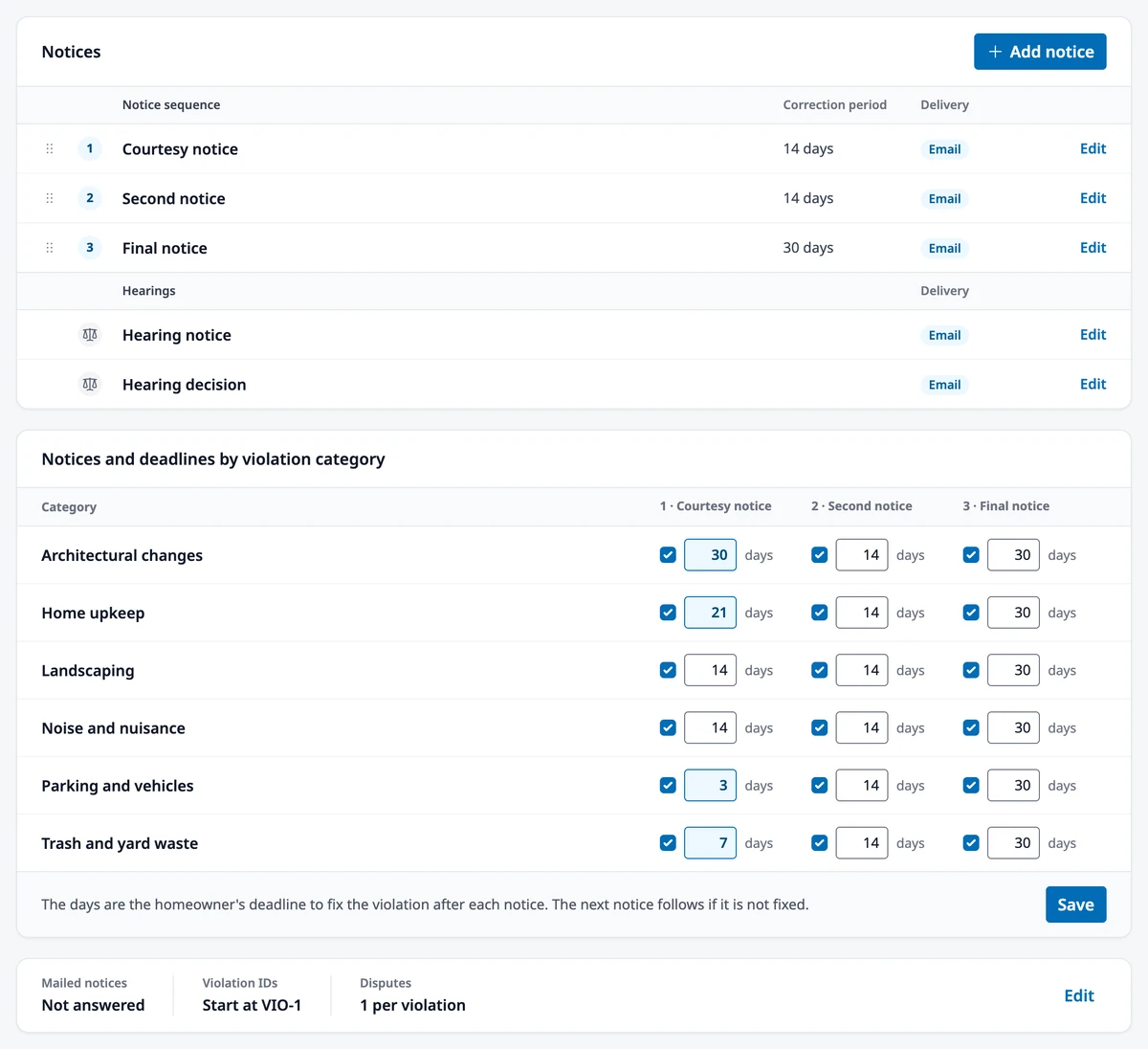
Section titled “Notices”When you issue a violation, HOA Hub sends the first notice in your sequence. Each notice gives the homeowner a correction period: the number of days they have to fix the problem. If it isn’t fixed by the deadline, the next notice in the sequence goes out the following day. After the last notice’s deadline passes, Owners and Admins are told the violation needs a decision.
Click Edit on a notice to change its wording, its correction period, or whether it’s also mailed; see Editing Violation Notices. Click Add notice to add a notice to the end of the sequence, and drag notices to change their order. Open violations follow the new order: each one gets the next notice it hasn’t received yet. The Hearing notice and Hearing decision aren’t part of the sequence; they go out when you schedule a hearing and when you record its outcome.
Deadlines by category
Section titled “Deadlines by category”Different rules can call for different timelines: a car parked on the street might get 3 days, an unapproved fence 30. Under Notices and deadlines by violation category, choose which notices each category gets and how many days the homeowner has after each one, from 1 to 365, then click Save. Every category needs at least one notice. The categories come from your Rule Library.
A change applies to notices sent from then on. Deadlines already given in a notice stay as they are.
General settings
Section titled “General settings”Click Edit beside the general settings at the bottom of the page.
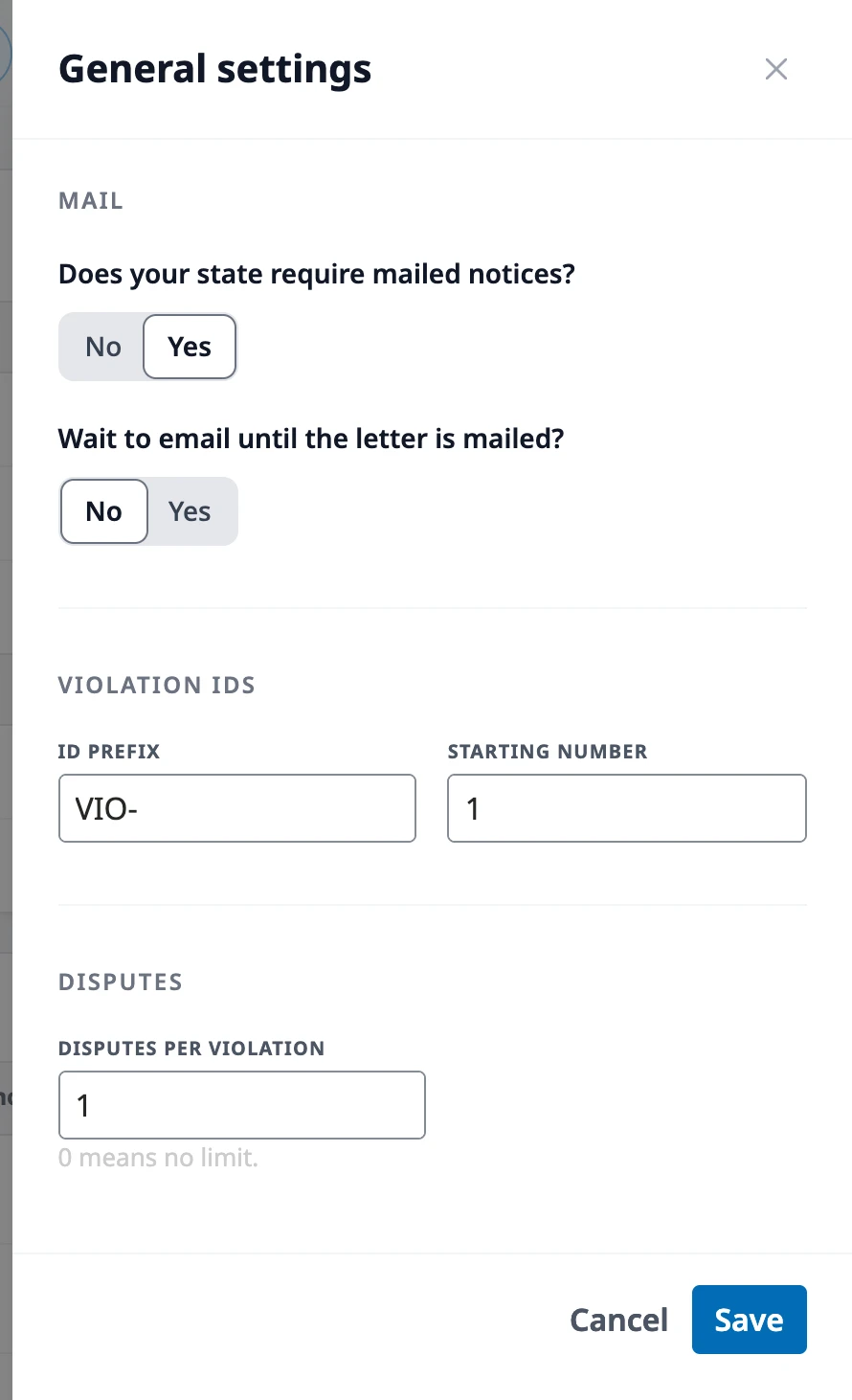
- Does your state require mailed notices? Answer Yes if your notices must also go out on paper. Mail then turns on for every notice, so each one also produces a printed letter; turn it off on any notice that doesn’t need one. If you later answer No, new notices get no letters, and letters already waiting stay in Mailings until you mail or skip them.
- Wait to email until the letter is mailed? appears when you answer Yes. With No, the email goes out as soon as the notice is created. With Yes, each homeowner’s email waits until you mark their letter mailed or skip it, and they don’t see the notice in HOA Hub before then. Either way, the deadline counts from the day the notice is created.
- ID prefix and Starting number control how violations are numbered. For example, with a prefix of “VIO-” and a starting number of 100, the first violation is VIO-100, the next VIO-101, and so on. The starting number only applies to the first violation that uses a prefix; after that, each new violation takes the next number.
- Disputes per violation limits how many times a homeowner can dispute one violation. Enter 0 for no limit.
Where to go next
Section titled “Where to go next”- Changing the wording of a notice? See Editing Violation Notices.
- Printing and mailing letters? See Managing Violations.
- Adding the categories your deadlines are set by? See Managing the Rule Library.
- Recording your first violation? See Managing Violations.
- Numbering variances too? See Managing Variances.