
Editing Violation Notices
Every violation notice combines your wording with details HOA Hub fills in for each violation. Go to Violations → Settings and click Edit next to the notice you want to change.
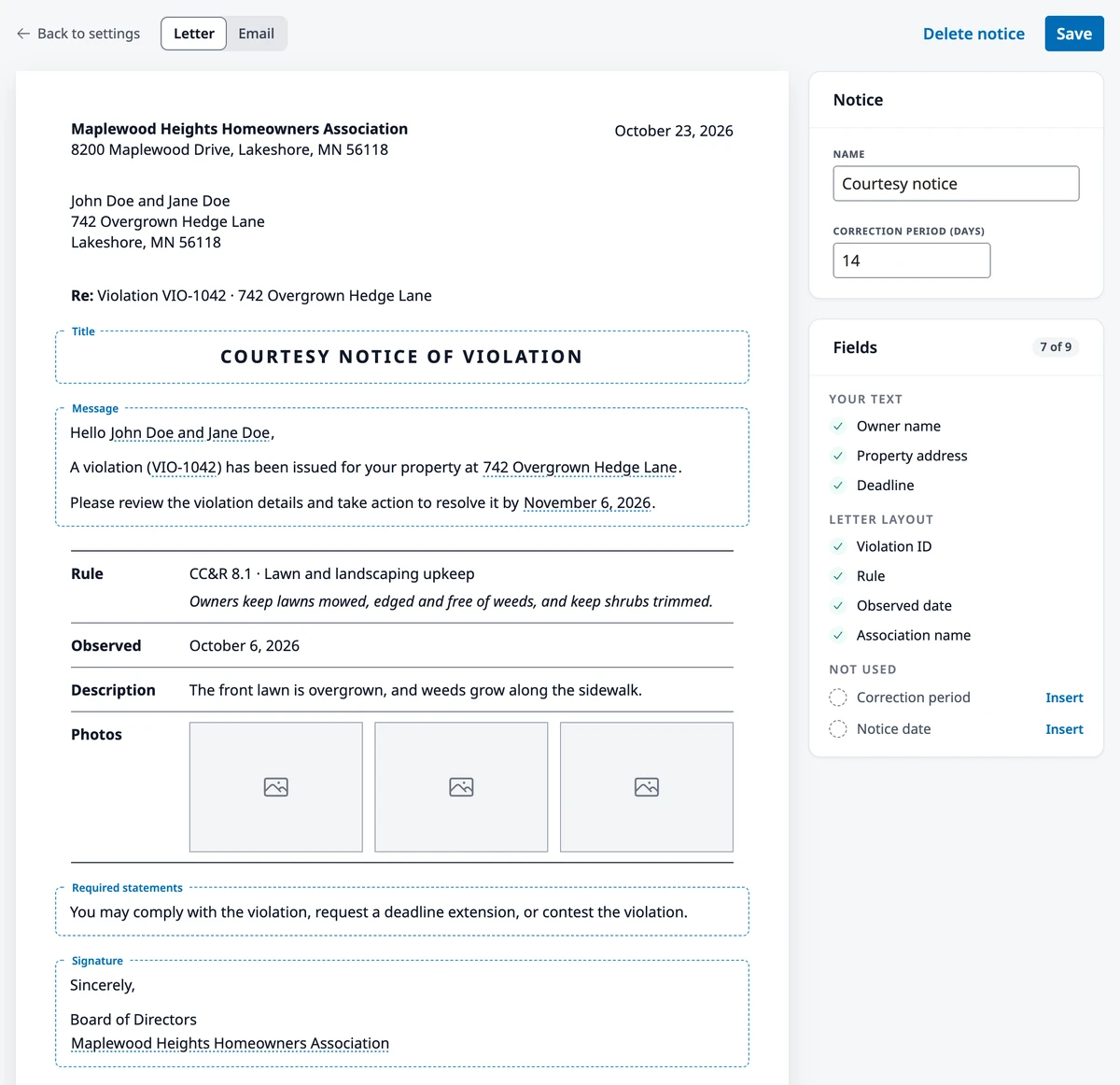
Your text and the layout
Section titled “Your text and the layout”You write the parts in the dashed boxes:
- Title — one line at the top, such as “Courtesy Notice of Violation”
- Message — what the homeowner needs to do, and by when. Every notice needs one.
- Required statements — wording your state or governing documents require, such as the homeowner’s right to a hearing
- Signature — who the notice comes from
HOA Hub adds the rest. A letter opens with your association’s name and address, the date, and the homeowner’s name and mailing address. Below your message it lists the rule, the date the violation was observed, the description, and the photos, and it ends with a QR code and the web address where the homeowner can respond online. An email shows your association’s name above your text and a View violation button below it.
Switch between Letter and Email to see the notice both ways. Both use the same text, so you write it once. The editor fills everything in with sample details, so you read the notice the way a homeowner will.
Fields
Section titled “Fields”A field fills in each homeowner’s details when the notice goes out: “Please fix this by” followed by the Deadline field becomes “Please fix this by November 6, 2026.” To add one, click in the message, the statements, or the signature, click Insert field, and choose the field. The menu lists only the fields that work in this notice. The title is plain text and can’t hold fields.
The Fields card lists the fields this notice uses. Click Insert next to an unused field to add it where you last typed. A few fields have rules:
- Every notice in the sequence must tell the homeowner how long they have: use Deadline for the date or Correction period for the number of days.
- The Hearing notice must include the Hearing date, Hearing time, and Hearing location.
- The Hearing decision can include the board’s Decision. When the board upholds the violation, HOA Hub adds “Correct the violation by” and the new deadline below your message, so the decision needs no deadline field.
- Previous notice date can’t go in the first notice of the sequence, or in any notice a category starts with, because no notice came before it.
The Fields card shows a missing or misplaced field in red, and the notice can’t be saved until you add or remove it.
Name, correction period, and mail
Section titled “Name, correction period, and mail”For a notice in the sequence, the Notice card holds its Name, which is how it appears in your lists and in each violation’s History, and its Correction period (days), from 1 to 365. A category can give the homeowner a different number of days; see Violation Settings.
When your state requires mailed notices, the card also has a Mail checkbox (on the hearing notices it sits in a Delivery card). With Mail checked, each notice also produces a printed letter for you to mail; see Managing Violations. Answering Yes to the mail question checks Mail on every notice, so uncheck it on any notice your state doesn’t require on paper, such as a courtesy reminder.
Click Save. Your changes apply to notices sent from then on; notices already sent keep the wording they went out with.
Add a notice
Section titled “Add a notice”On the Settings page, click Add notice. Give the notice a name, a correction period (it starts at 14 days), and its text, then click Save. It joins the end of the sequence, and every category includes it at that correction period until you change it in the category grid.
Delete a notice
Section titled “Delete a notice”Open the notice, click Delete notice, and confirm. This can’t be undone. Violations that already received the notice keep it in their History, and open violations move on to the next notice in the sequence.
HOA Hub won’t delete a notice when the sequence or a category would be left with no notice, or would start with a notice that uses Previous notice date. The Hearing notice and Hearing decision can’t be deleted.
Where to go next
Section titled “Where to go next”- Changing which notices each category gets, or their days? See Violation Settings.
- Printing and mailing letters? See Managing Violations.
- Wondering what the homeowner sees? See Responding to a Violation.