
Your Profile
Your profile is where you manage your personal information, security settings, what neighbors see about you, and your notifications. To get there, click your name or avatar in the top-right corner and select Profile.
Edit your information
Section titled “Edit your information”The Profile tab lets you update your name, photo, email addresses, phone numbers, and birthday. Click Save Changes when you’re done.
Your preferred email address is locked, with the note Synced from login email, once your login email is verified. To change it, update your login email on the Security tab.
Security
Section titled “Security”The Security tab is where you manage your login credentials.
Change your login email
Section titled “Change your login email”You can update the email address you use to log in. Changing it requires re-verification: you’ll need to click a link in a confirmation email before you can use the app again.
Change your password
Section titled “Change your password”Enter your current password and choose a new one. Passwords must be at least 8 characters and include uppercase and lowercase letters, a number, and a symbol. A password that has appeared in a known data breach is rejected.
Preferences
Section titled “Preferences”The Preferences tab controls how you experience HOA Hub. Click Save Preferences after you change anything on it.
Timezone
Section titled “Timezone”Set your timezone so dates and times display correctly for you.
Directory
Section titled “Directory”These settings decide what other residents see about you in the Directory.
- Show me in the Directory — turn it off to leave the Directory. Other residents no longer see you on the People tab or on your property’s Units card.
- Preferred email, Alternate email, Preferred phone, and Alternate phone — check the ones you want on your contact card. The address or number next to each box is the one neighbors will see.
Until you change a box, it follows your association’s default, so it may start checked or unchecked. Once you change it and save, your choice stays even if the association changes its default later. If your association has turned contact details off, only the switch appears.
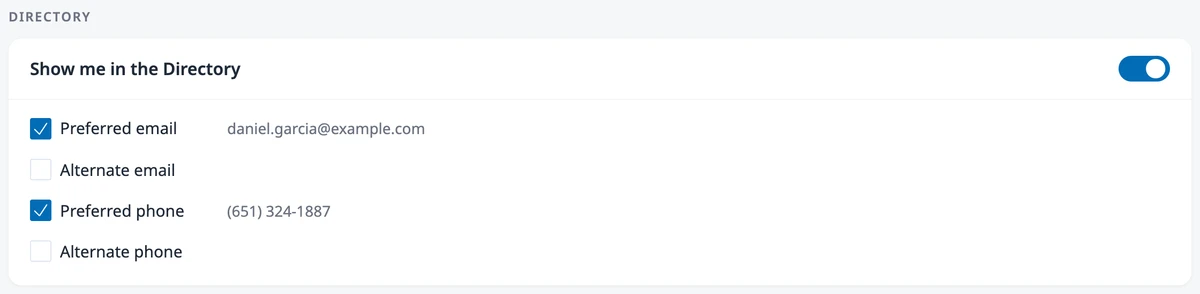
These choices control what other residents see. Owners, Admins, and Board Members still see your full contact record.
Notifications
Section titled “Notifications”Choose which kinds of updates you receive by email and which appear as website notifications.
Where to go next
Section titled “Where to go next”- Looking up a neighbor? See Finding Your Neighbors.
- Locked out of your account? See Resetting Your Password.