
RSVPing to an Event
When an event is open for registration, you can sign up directly from the events list, the event detail page, or your dashboard — wherever you happen to see it.
Signing up
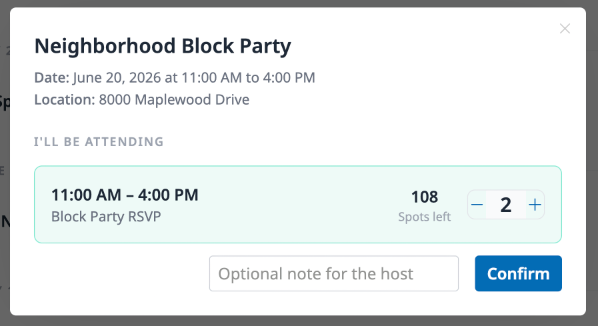
Section titled “Signing up”Click the Sign me up button on any event. A modal opens showing the event details and lets you set your attendance. If the event has multiple guest lists — say, different time slots or activities — each one is listed with the number of spots remaining. Use the + and - buttons to set how many people you’re bringing to each one.
You can also add an optional note for the host, like dietary preferences or a question about parking. Click Confirm when you’re ready.
Changing or canceling your RSVP
Section titled “Changing or canceling your RSVP”Already signed up? Click Sign me up again on the same event. Your current selections are pre-filled, so you can adjust the numbers and confirm. To cancel entirely, set all counts to 0 and confirm — your spot will be released.
Spots and availability
Section titled “Spots and availability”Each guest list shows how many spots are left. If capacity is unlimited, you’ll see 100+ spots available. When a guest list fills up, you won’t be able to add more guests beyond the remaining spots.